Sunday, May 5, 2013

BLACKBERRY Q10 AVAILABLE


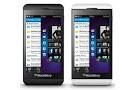
While Nigerians are still waiting for the almighty Q10,the wonderful looking Q10 went on sale in Toronto Wednesday, a day before other markets in Canada, giving the residents of the country’s largest city the first chance to snap up the keyboard-equipped device.
The Q10, which has a physical keyboard and a small touchscreen, is the second smartphone Waterloo, Ontario-based RIM has launched this year. The all-touchscreen Z10 was released in Canada in February, and has trickled out in other markets, including the U.S and Nigerian market especially in Lagos and Abuja.
While sales of the Z10 appear to be decent in some markets–like Canada and the U.K.–where the phones hit first, analysts have higher expectations for the Q10 that die-hard fans of the iconic BlackBerry keyboard have been holding out for it.
But first they have to find the phone. If shoppers didn’t pre-order a Q10 online, it was tough to find one in stores in central Toronto.
But currently the Blackberry Q10 is available in Canada. However the Q10 was said to be available in Nigeria on the the 2nd of May 2013 which i am yet to believe.

How to Reset Password on Blackberry Z10

How to Reset Password on Blackberry Z10


Password is indeed very good for security reasons but when you forget it,then you are in for trouble. Just today, a friend met me in Apapa and said that he is ready to pay N5000 to reset his BB Z10 password. 

Sunday, April 28, 2013

IPHONE 6

Short of words because i do not know what to say about this amazing  Iphone 6. So i will just keep quite and let you watch the video

Tuesday, April 23, 2013

Saka just ported....many more can do same

​Wow! I was filled with a new kind of joy that i have never experienced before when i saw Saka video clip. The greatest Icon of the Etisalat advert home just switched to the best network in Nigeria. He is still retaining his 0809ja number but now on MTN network. Let's give Saka a standing ovation and borrow that his amazing smile. MNP is here!!! Let's spread the good news to Nigerians as so many still do not have knowledge of MNP.

Thursday, April 18, 2013

How to Edit the Code of a Joomla Template

 
Below is how you can edit a joomla template and make it look like you did the whole job. An average Nigerian is now a web designer all because Joomla has made everything easy.
 
 
image0.jpg
When you customize a template in Joomla, you typically make changes to its CSS code.
To open a template’s CSS file for editing, follow these steps:
  1. In the template’s Details page, click the Edit CSS button.
    The Customize Template page opens. This page lists the CSS files associated with the template — usually, a lot of them.
    image1.jpg
  2. Click the name of the style you want to edit.
    The style’s CSS file (template.css) opens for editing in Template Manager.
    image2.jpg
The template.css file is a long one — about 16 pages — and that’s just one of the files that goes into a Joomla template. It’s a bona-fide CSS file, and here’s how it starts:
/*****************************/
/*** Core html setup stuff ***/
/*****************************/
html {
 height: 100%;
 margin-bottom: 1px;
}
form {
 margin: 0;
 padding: 0;
}
body {
    font-family: Helvetica,Arial,sans-serif;
    line-height: 1.3em;
    margin: 0px 0px 0px 0px;
    font-size: 12px;
    color: #333;
}
a:link, a:visited {
    text-decoration: none;
    font-weight: normal;
}
a:hover {
    text-decoration: underline;
    font-weight: normal;
}
input.button { cursor: pointer; }
p { margin-top: 0; margin-bottom: 5px; }
img { border: 0 none; }
/*****************************************/
/*** Template specific layout elements ***/
/*****************************************/
#page_bg {
    padding: 10px 0;
    margin-bottom: 1px;
}
div.center {
 text-align: center;
}
div#wrapper {
    margin-left: auto;
    margin-right: auto;
}
body.width_medium div#wrapper {
    width: 950px;
}
   .
   .
   .
Unfortunately, to edit this file you really have to know what you’re doing in CSS to make your own changes. (A good WYSIWYG code editor built into Joomla would be great for this situation.)
There’s a lot of debate about whether it’s better to use HTML tables or CSS to arrange components and modules in Joomla templates; both sides of the argument have strong points.
HTML tables, for example, are pretty rigid structures that make it hard for search engines to understand the content of your page. CSS implementations, on the other hand, vary widely from browser to browser, and some older browsers allow you to use only minimal CSS. The Beez template in Joomla is an example of a tableless CSS template.
As you can see, truly customizing a Joomla template is not something to be undertaken lightly. So how do you get the template you want? You can download it. There are Joomla templates online. Some are free while others require a small fee to download.

Tuesday, April 16, 2013

How to extend BB Z10 battery life


So many people using the BB Z10 have been complaining of poor battery life of the phone. Battery life varies depending on how you use your BlackBerry device. To help battery power last longer,  below are the things to do :
  • Use the power-saving options in your device settings. To adjust the screen brightness or change the screen lock timeout, on the home screen, swipe down from the top of the screen. Tap Settings > Display.
  • Turn down the device volume with the volume keys on the right side of your device. To adjust other volume settings, on the home screen, swipe down from the top of the screen. Tap Settings > System Volume or Notifications.
  • Close any apps or features that you are finished using so that they aren't continously running in the background. Some features consume more battery power than others and should be closed or turned off when not in use. For example, the camera, the browser, Voice Control, GPS, and Bluetooth technology.
  • If your device is out of a network coverage area, turn off the connection so that your device doesn't continuously search for a network signal. To turn off or change network connections, on the home screen, swipe down from the top of the screen. Tap Settings > Network Connections.
  • Use the latest version of BlackBerry Device Software. If a software update is available for your device, a notification appears in BlackBerry Hub.
  • Save data to a media card instead of your device storage.
  • Turn off the camera flash.
Tip: Like most electronic devices, your device battery will drain less quickly if you keep it out of the sun and other hot places, keep the contacts clean, and charge it regularly. Avoid leaving your device turned off with a low battery power level for an extended period of time.

How to copy and paste in BB Z10.


Below is how to copy and paste in BB Z10.


  1. To highlight text, touch and hold the text. To change your selection, move the cursor indicators.
  2. Do one of the following:
    • To copy the text, touch and hold the highlighted text. Tap Copy.
    • To cut the text, touch and hold the highlighted text. Tap Cut.
  3. To paste the text, touch and hold where you want to paste the text. Tap Paste.

Popular Posts